Tag Archives: TimeControl

Timesheet Sign-off brings efficiency improvements

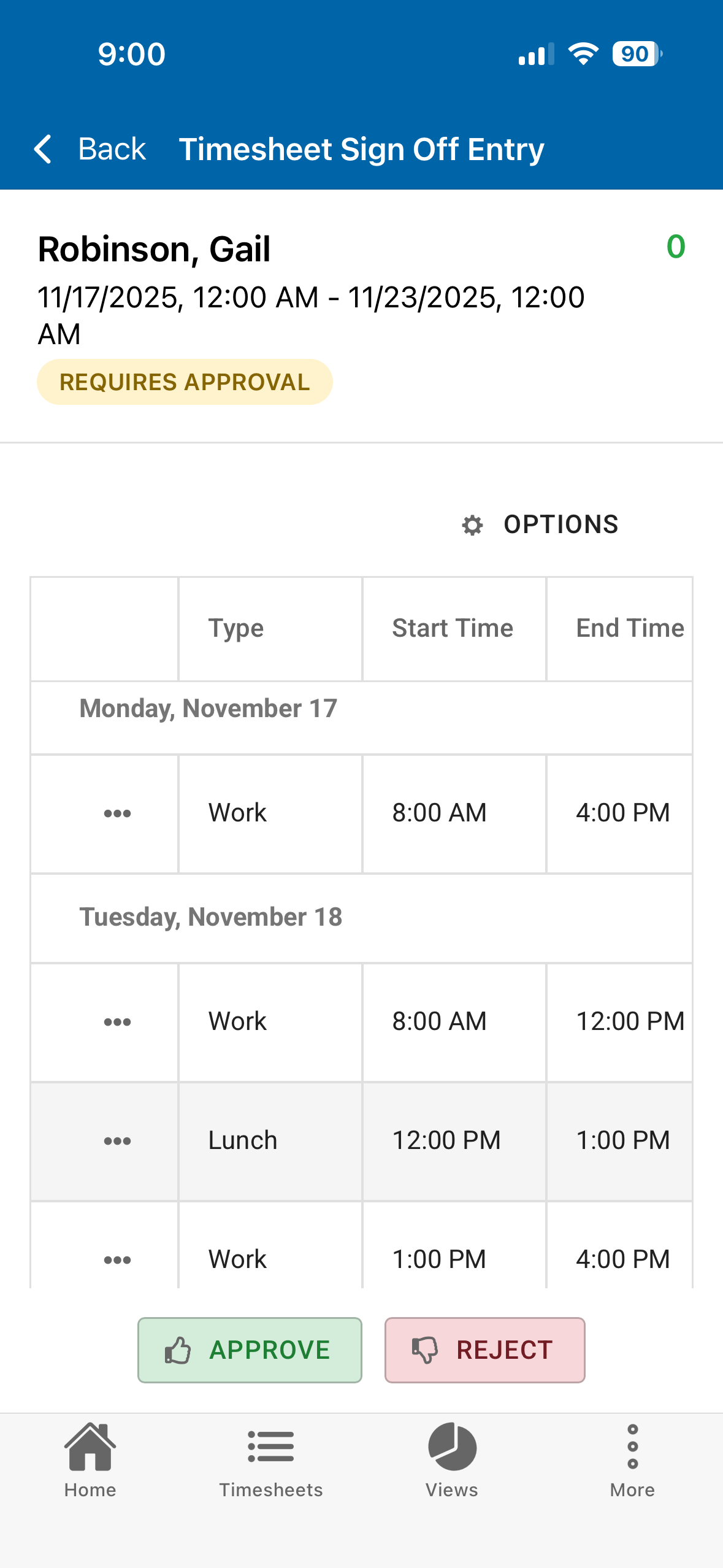
TimeControl timesheet sign off, In TimeControl 8.6.1, we introduced Timesheet Sign-off.  This feature is designed for a situation where compliance regulations require that an employee approve of the hours entered on their behalf.  This might include when a short break was given and when a meal break occurred along with the total time worked.  There are a number of government compliance requirements that insist that each employee sign-off on the summary of the timesheet.  These government regulations don’t care much about what was done at the time but they care very much about how much time the employee worked and whether they were given appropriate work breaks.  This is common to the California Work Rules regulations and for some DCAA contracts.

This can be easily done in TimeControl of course, but there are numerous business situations where the end-user employees will have all this data entered for them.  In those situations we don’t need to have each employee (some of which may be part time or temporary) fully trained on using and filling in TimeControl but we still must allow them to review the data entered on their behalf and agree that it is accurate.

We do this with Timesheet Sign-off.

The feature is available both on TimeControl on the web and on the free TimeControl Mobile App.  The end user can see any timesheets done for them, look at the details and the start/stop information then simply click on the Accept or Reject button.

Centrally, all timesheets can be reviewed to see that they were accepted and deal with any exceptions.

The employee must have a TimeControl User license but their involvement with TimeControl is so simple it shouldn’t require any training at all.

The feature must be activated by the Administrator and is part of TimeControl, TimeControl Online, TimeControl Industrial and TimeControl Industrial Online.

TimeControl’s full function API has been a part of its architecture since 2017

TimeControl API Dynamic Documentation, HMS, Chris Vandersluis, Christopher Vandersluis, Christopher Peter Vandersluis
TimeControl API Dynamic Documentation

TimeControl’s full-function API has been a part of its architecture since 2017

Nine years ago, We launched the TimeControl Application Programming Interface (API). Like all of TimeControl’s infrastructure, we were focused on two goals: Flexibility and Security.

The result is a fully bi-directional RESTful API that is remarkably functional.  It is a part of every edition of TimeControl including TimeControl on-premise, TimeControl Saas Online, TimeControl Industrial on-premise, TimeControl Industrial SaaS Online and TimeControl project.

With most TimeControl environments requiring integration and communication with other systems, the API is the ultimate in integration.

The API carries all the same security measures that TimeControl is famous for.  It can be turned on and off by administrators for the entire instance in the System Preferences and if enabled, then controlled through a TimeControl User Profile.  The most common use-case is to use a single user profile for API interactions with authentication controlled in the same way you would do with any administrative user.  The data made available to the API  can be controlled right in that User Profile definition just as you would do with an in-person user..  That is a remarkably advanced structure as it allows as much API access as you define regardless of what the programmer writes in code that access the API.  This could allow, for example, some API access from one country buy only seeing the data for that country while another User Profile would gibe API access from another country and only see that data.

Using the TimeControl API lets you create a blended corporate environment where data from one system can be updated into another completely in the background without user intervention.

The TimeControl API has a huge range of methods available.  Data from all the tables holding your TImeControl data can be pushed or pulled at any time and the API will ensure that all of TimeControl’s data control rules are followed.  The API has extensive messaging and we provide numerous examples and startup code to get you started quickly.

TimeControl includes dynamic API documentation that is actually generated by the API itself whenever you ask for it in the help menu. The result is an always up-to-date exactly for the version you are in with information on each method as well as example code on how to connect to TimeControl and guidance on how to get your project started.

For more information on how the TimeControl API can help you create an integrated business environment, contact HMS at: TimeControl.com/contact.

Welcome to 2026 and an exciting year to come!

Welcome 2026, TimeControl, Enterprise Timesheet, Chris Vandersluis, Christopher Vandersluis, Christopher Peter Vandersluis2025 was a great year for HMS and 2026 is shaping up to be even more exciting!  There is a lot going on that we’ll be sharing with our TimeControl community in the coming days.

First of all, we are in the middle of the TimeControl version 8.6.1 launch.  The product is already available for TimeControl on-premise and TimeControl Industrial clients and in the next two weeks our TimeControl Online, TimeControl Industrial Online and TimeControl Project clients will get upgraded automatically and will be able to enjoy the new and improved features.  See What’s new in TimeControl 8.6.1 to see a list of what has changed.

Next, there has been lots of press about HMS and TimeControl lately.  We’ll talk about that more in a separate blog post but we were delighted to find ourselves in International Business Times over the holidays.

And there is so much more.  Look for a new blog post in the coming days about the link with the Birdview PSA project management solution.  The Link is now part of TimeControl 8.6.1 and we are working with Birdview to make sure everyone knows about it.

It’s going to be a very exciting year and it’s just getting started!

Supporting a hybrid workforce

TimeControl supporting a hybrid workforce, Timesheet, hybrid timesheet, Chris Vandersluis, Christopher Vandersluis, Christopher Peter VandersluisFor so many in the technical world, working remotely or in a hybrid environment has become commonplace.  Many of our staff work on a hybrid schedule here at HMS.  TimeControl is ideal for supporting this.

The flexibility of TimeControl allows almost any kind of data to be attached to or configured right into the timesheet interface.   For example, some of our clients require knowing where work was accomplished.  Was this work done from home or from our office?  Other clients need to know how many days an employee worked at the office and what days those were.

This is easily accomplished in TimeControl through timesheet user defined fields.  We can enter a new column for “work/home”  then give TimeControl only certain options such as “home” or “work” to allow a drop down list.  The list can be as long as you wish.  Alternately it could be left open so people could type in a location.

TimeControl hybrid support with home / work column

Once the data is collected, then reporting on it, filtering it or looking for discrepancies is as easy as can be.  The field doesn’t even need to be filled in by everyone.  You can hide such a field using TimeControl’s user profiles so it only appears for certain departments where the data is relevant.

Also, like all other timesheet data.  This type of field can be used for creating validation rules so you can make the field mandatory or create warning message for people out of compliance for your own internal hybrid practices.

If you are using TimeControl Online or TimeControl Industrial Online, our Software as a Service subscription in the cloud, then you already know your employees can access TimeControl from anywhere in the world either on the web or via our free TimeControl Mobile app.  If you are using an on-premise TimeControl then all you have to do is ensure that TimeControl is outward facing so it can be accessed while out of the office.

Flexibility allows TimeControl to be many things.

Supporting a hybrid workforce is just one.


The Timesheet Audit with TimeControl

Timesheet Auditability, TimeControl, Chris Vandersluis, Christopher Vandersluis, Christopher Peter VandersluisFor many organizations, there comes a time when the data in your timesheet becomes the subject of an audit.  There can be many reasons for this.  Perhaps there is a research and development tax claim and the government auditor wishes to reconcile the time you have recorded in timesheets against the task-by-task descriptions in the claim. Perhaps your organization is a publicly traded company and undergoing verification for Sarbanes-Oxley compliance.  Perhaps there is a need to reconcile and validate the time taken by each employee for sick leave, vacation or personal time against the Human Resources department records.  Or, perhaps it’s just a validation of collected timesheets for some other internal process.  Whatever the reason, TimeControl was designed to support the auditing of its records.

TimeControl Administrators never fear a timesheet audit!

When something is woven into the architecture, we rarely think about it.  Auditing isn’t a “feature” or “function” of TimeControl.  There’s no Audit button.  The manner of collecting and verifying data has been thought about since the earliest days of TimeControl’s existence decades ago.  It is a part of everything in the product.

We take care to ensure the timesheet data is auditable in so many ways.  Once data is posted, for example, it can only be changed through our adjustment or Debit/Credit functionality which tracks who made the change, what change was made and exactly the date and time of the change.  We also track who approved a timesheet and when and the path of that timesheet from draft to released to rejected (if it was) to released again and finally to posted.  We track the work of Alternate Users to ensure that the audit trail isn’t obscured by someone doing timesheet data changes on behalf of someone else.  We also make sure that the data that is going into the timesheet is coming from lists of employees and charges that have been validated and tracked by design with referential integrity.

We have had many praises from both internal and government auditors for how effectively TimeControl gives them what they need to accurately report what happened with timesheet data.

You can find out more on the TimeControl Auditability story in the TimeControl Auditability white paper on the TimeControl website or, feel free to contact the TimeControl team to discuss your interest in timesheet auditability.


Timesheet Creation

TimeControl best practices, timesheet time saver, Chris Vandersluis, Christopher Vandersluis, Christopher Peter VandersluisSo many options in TimeControl are designed to simplify the data entry process.  Timesheet Creation is just one.

For timesheet administrators, the depth of functionality in TimeControl including its remarkable flexibility is a huge draw.  That’s not the same for end-users.  End-users typically view having to enter their timesheet as a necessary evil.  They’d avoid it if they could but if they have to do it, they’d like the process to be as quick and easy as possible.

That’s one of the reasons we created the Timesheet Creation function.  In its first few versions, TimeControl would ask users to create their next timesheet and then, depending on the options selected by the TimeControl Administrator and the end user, the timesheet would be pre-loaded with lines that were expected for that week.

Timesheet Creation allows the TimeControl Administrator to create the timesheets for end-users in advance.  This means, when they enter the system at the beginning of their week (or whatever their timesheet period is), the timesheet is already there, already pre-loaded with expected tasks and ready to be entered.

Not every organization wants to work that way but for many, it’s a small time-saver that pays dividends in a couple of ways.  First, everyone’s timesheet is created at the same time with the same options and that helps with consistency and a uniform user experience.  Next, if the end-users select the timesheet-entry screen to be their home-screen, what appears when they log into TimeControl is their current week’s timesheet, already created, already pre-populated with all the expected tasks already loaded.  This can serve to lower the resistance to doing the timesheet at all and can promote entering the timesheet quickly.  Finally, having the timesheet already created eliminates one possible step and one possible end-user error point.  The Administrators can create multiple timesheets in advance or even in the past if that is required.  The configuration of how many periods can be created is controlled in TimeControl’s System Preferences.  The Timesheet Creation also doesn’t need to be applied universally.  It can be constrained for certain groups or certain locations as the Administrator decides.

Of course, the end-user may have other tasks they did this week that were unanticipated.  Almost everyone does something in their week that wasn’t in the plan on Monday morning.  TimeControl will always allow users to add to the timesheet from any possible charge codes that are available to that user.

The savings of the Timesheet Creation function is perhaps only 30 to 60 seconds.   But think about that this way.  If you have 1,000 users, that 1,000 minutes a week that’s saved.  52 weeks a year means 52,000 minutes.  That’s a half a person-year in savings.  And that’s just from one possible feature in TimeControl.

We often talk about best-practices for both organizations and individuals using TimeControl.  You can find webcasts, papers and presentations on the subject in the Timesheet Best Practices section of our website at: www.timecontrol.com/resources/best-practices.

Why a multi-purpose timesheet?

Multi purpose timesheet, TimeControl, Swiss Army Knife, Chris Vandersluis, Christopher Vandersluis, Christopher Peter VandersluisWe often speak to organizations who have experienced the madness and heartache of deploying multiple timesheets and finding that this has made them much less effective as a result.  For those who might have never had this experience, let’s talk for a moment about the benefits and drawbacks of using a multi-purpose timesheet like TimeControl.

How did we end up here?

First, let’s talk for a moment about how organizations deploy multiple timesheets.  Clearly no one wakes up one morning and says “I have a great idea.  Let’s deploy as many different timesheet systems as we can.”  No. This happens because timesheets are needed for so many disparate processes and each of these processes first checks to see if any existing timesheet systems in the organization will meet their needs and, if not, proceeds to acquire and deploy its own timesheet.

So the payroll system has a timesheet and they aren’t interested in changing it.  Billing has a timesheet too.  That’s different from the time and attendance timesheet used by payroll.  HR needed a timesheet but just for time-off; kind of a negative timesheet.  Project management needed a timesheet that would identify not just if you were working but what you worked on and for how long as well as how much time will be needed to finish off what you’re working on.  Other timesheets may have been deployed for field-data-collection, R&D tax credits, Government auditing requirements such as DCAA and more.  So, having 3, 4, even 7 or 8 different timesheets is not impossible.

Multi-purpose timesheet benefits

Choosing a multi-purpose timesheet like TimeControl brings numerous instant benefits.  First, it reduces the number of timesheets to maintain, manage and even reconcile.  In some organizations employees are asked to fill in 2, 3 or even 4 timesheets at the end of the week.  Now, they fill in one.  So employee satisfaction goes up.  It’s not that employees like filling in timesheets, even just one.  But, if you explain that they will be going from 4 timesheets to 1 timesheet, you end up with happy employees.

Next, there’s now one version of the truth.  When you look for time data, you don’t got to multiple systems.  We’ve seen organizations where the effort to reconcile the timesheet data from a time and attendance system with a project system is monstrous.  Multiple employees dedicated to trying to figure out how the time recorded in system one reconciles with system two is not an effective use of personnel.

Auditing become so much easier.  We’ve seen this in numerous situations and with numerous organizations where previously an audit might have been impossible, now the audit is not only possible but almost instant.  When all the data is being validated in the same place at the same time, the work of an auditor becomes very simple.

Multi-purpose timesheet challenges

It’s not all free benefits.  One of the challenges in deploying a multi-purpose timesheet for bringing multiple business processes together is that the people managing those processes have to communicate with each other.  This is often one of the longest parts of a deployment.  It is extremely common for us to have a meeting where Finance is represented including Payroll and Billing, Project Management is represented and the IT department is represented almost as a referee.  In many cases, the Finance people have never met the Project people.  These teams will have to strike a balance between what each business process needs.

Flexibility also carries its own work.  When you have a system which is as open architecture as TimeControl, you have to be responsible for what you design, configure and deploy.  We sometimes see an organization deploy our multi-purpose timesheet and once deployed, the team is disbanded.  Then, a year later, no one who is a part of the day-to-day operations of the timesheet understands the decisions that were made in its configuration.  Happily at HMS, we keep all those kinds of records and documents and more than once we’ve had to regroup the different parts of the organization to help explain why they made the configuration decisions they did and how that affects the different business processes involved.

Multi-purpose timesheets can make the difference

Some organizations decide that they just don’t want to mingle processes like Finance and Project Management and are willing to accept the costs and drawbacks of deploying multiple timesheet systems but for many, a multi-purpose timesheet can be the answer to so many challenges all at once.

Do you know how much time is in the vacation bank?

It’s summTimeControl Detailed Vacation Bank Report, TimeControl, Enterprise Timesheet, Chris Vandersluis, Christopher Vandersluis, Christopher Peter Vandersluisertime and for many organizations, that means employees are taking advantage of the warm weather to take vacations.  For some, those vacations have been planned earlier in the year, for others, they are just making their plans.

TimeControl provides tools to track not just when employees took vacation but how much vacation time an employee has earned and how much they’ve taken throughout the year.

The Employee Bank is one of multiple banks of time within TimeControl that can be activated and monitored.  Time can be earned automatically within TimeControl using the Accruals module.  Alternately, if this is managed elsewhere, the banked time can be imported from outside sources such as the HR system.  Once earned, the banked time is visible to the employees in a report or a dashboard view.

When it’s time to take vacation, the employee selects a charge code for that in their timesheet either in advance or after their time off.  TimeControl then automatically deducts that time from the appropriate bank.

One of the most time-consuming parts of vacation banks for management are discussions with employees about how much time they’ve earned or taken but this too can be managed in TimeControl with the Detailed Employee Bank report.  For day-to-day operations, the report has a dynamic view which can be viewed and filtered instantly no matter how many employees there are.

Vacations are the most common but only one aspect of banked time off and scheduled time off.  TimeControl can also impose validation rules on TimeRequests for time off to ensure the rules are followed of time off requests vs. time in the bank.  Other banked time can also be tracked such as sick leave or personal time off.

You can find out more about how TimeControl manages time off requests and vacations at: www.timecontrol.com/features/vacation-approvals and more about accruals at: www.timecontrol.com/features/accruals.

Frequently asked questions and the different places to get answers

Frequently Asked Questions, FAQ, TimeControl, Timesheets, Chris Vandersluis, Christopher Vandersluis, Christopher Peter VandersluisWith an enterprise system like TimeControl, questions are common.  TimeControl can be used in so many different ways and each deployment is unique.  So, as a client or even a prospective client, where can you get answers?

TimeControl’s extensive documentation.

There are documentation guides which are part of every TimeControl.  Your Administrator may not have given you access to all documentation files.  They include: User Guide, Reference Guide, Report Designer Guide, TimeControl Project Guide, BI Guide and API Guide.  You should be able to access these guides from within TimeControl at the top right of the screen under the “?” icon.

FAQs

Let’s start with the TimeControl Frequently Asked Questions section.  These are some of the most common questions we’re asked by prospective and new clients.  We’ve put those questions here and added our own most common answers.

Find out more at: https://www.timecontrol.com/support/faq.

TimeControl Blog

The TimeControl Blog is where we tend to write longer answers to questions.  Here is where we might talk about the specific way a certain feature can be implemented or to highlight a feature that some clients overlook because it wasn’t at the top of their priority list when they first deployed TimeControl.  We always list the latest features of new versions here but it’s also where we discuss or demonstrate different deployment tactics such as how to deploy TimeControl with entries in percentages instead of hours? Or how to handle multiple languages? Then your answer is probably in the blog.  Rather than scrolling through the hundreds of entries, just use the search bar to locate items of interest. There’s no cost or restriction to use the blog.

Access the TimeControl Blog at: blog.timecontrol.com.

Online Training Videos

We record a lot of training videos.  Many are short 5 minute demonstrations of how to use a particular TimeControl feature.  Some are longer webcasts. But a scroll of the TimeControl Online Learning Center can often reveal results you weren’t expecting.

Find out more at: https://www.timecontrol.com/resources/online-training/timecontrol-8.

YouTube

While we post our videos internally on the TimeControl website, we also post them on YouTube where you can use YouTube’s functionality to create sub-titles in the languages of your choosing.  Our YouTube channel is at: https://www.youtube.com/channel/UC-I21bjwfIq9JEioRUV8kLQ.

The TimeControl website

The resources on TimeControl.com are extensive including slide shows, white papers, factsheets and more.  Just use the Search feature to look for information of interest.

The website is at: https://www.timecontrol.com/.

Oracle has confirmed that HMS Software will be part of the Oracle Partner Network for a 28th year

Oracle and HMS Software have confirmed that they have extended their technical alliance for a 28th consecutive year. Oracle Partner Network, Chris Vandersluis, Christopher Vandersluis, Christopher Peter Vandersluis

This is one of the longest lasting technical alliances in the IT industry.  The two companies started working together in 1997.

HMS sought out two technical alliances in 1997, one with Oracle to support TimeControl’s new ability to store data in an SQL database such as Oracle’s and another with Primavera to support the integration between the TimeControl timesheet system and Primavera’s extensive project management system. The intent of the alliance was to provide superior support to Oracle and HMS Software’s mutual clients.

The relationship and alliance has extended and deepened over the years.  That started with Oracle purchasing Primavera in 2008 and those two lines of integration and support were extended.    TimeControl now supports multiple Oracle products including NetSuite, JD Edwards and MySQL.

The intent of the alliance has not changed.  The beneficiaries are the same as they were back in 1997,  a superior level of support and integration for our mutual customers.

Some of the many TimeControl’s value-added benefits when linking with Oracle-Primavera include:

  • The multi-functionality and auditability of TimeControl that allows it be used for project management, HR, payroll, invoicing, job costing and government compliance all at the same time
  • Support for multiple rates per employee
  • Automated business rule validations
  • Automated workflow
  • Vacation management
  • Missing timesheet notification
  • Simultaneous support for multiple versions of Primavera
  • The free TimeControl Mobile App for smartphones and tablets supporting both iOS and Android
  • Matrix timesheet approvals with HMS’s unique Matrix Approval Process for Labor Actuals™
  • With TimeControl Industrial, the Crew Timesheet and Materials and Equipment field data collection

To read the recent press release on this relationship, visit TimeControl.com/resources/newsroom/press-releases/2024-05-15. For more information on how Oracle and HMS Technologies work together, visit the Oracle/TimeControl Portal at: Oracle.TimeControl.com or contact HMS at info@hms.ca.